
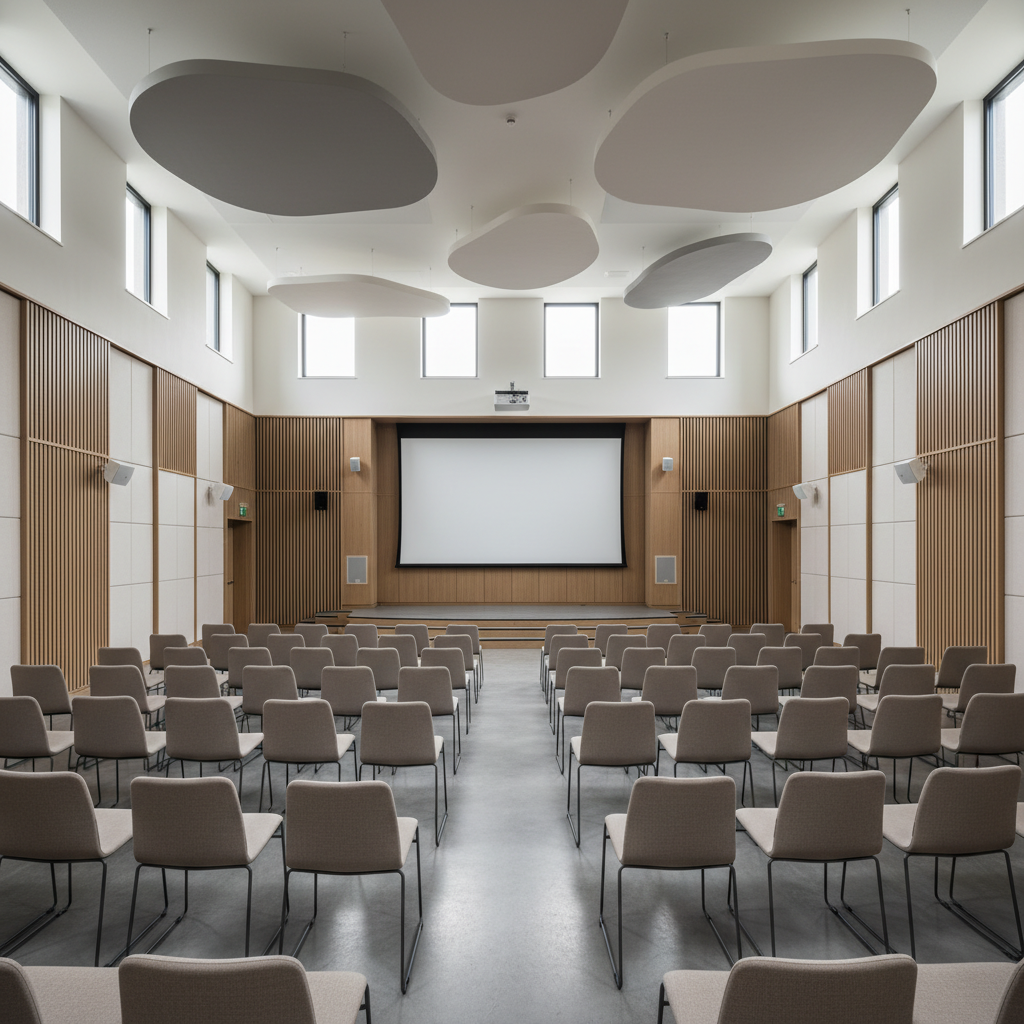
Seminar room acoustics is the science of shaping a room so speech is clear, even, and feedback-free. Effective designs target short reverberation (about 0.5–0.8 seconds), low background noise, and uniform loudness. For Mississauga planners using Mississauga Convention Centre, this seminar room acoustics guide shows exactly how to achieve reliable speech for conferences, trainings, and town halls.
By Preet Dass • Last updated: 2026-05-08
Quick Summary
Great seminar acoustics deliver intelligible speech across every seat. Aim for 0.5–0.8 s RT60, NC 25–35 background noise, and STI ≥ 0.6. Use a close-miked presenter, properly placed loudspeakers, broadband wall/ceiling absorption, and basic diffusion. Test the room with measurements, then fine-tune with EQ and layout.
- You’ll learn: What drives speech clarity, how to fix echo, and where to place panels/speakers.
- Why it matters: A 10–20% intelligibility lift can raise engagement, retention, and event ratings.
- Applies to: Corporate seminars, trainings, keynotes, school events, and hybrid sessions.
- Where we help: Mississauga Convention Centre provides in-house AV, staging, and diverse catering to simplify planning.
What Is Seminar Room Acoustics?
Seminar room acoustics is the practice of controlling reflections, reverberation, background noise, and loudspeaker coverage so spoken words remain clear and consistent throughout a room. The goal is intelligible speech—typically STI ≥ 0.6—with even sound pressure levels and minimal echo or feedback.
At its core, acoustic design balances three variables: the voice, the room, and the sound system. Each influences clarity, perceived loudness, and fatigue. In our Mississauga ballrooms and meeting spaces, we tune those variables so presenters sound natural and every attendee hears the same message.
Key acoustic terms in plain language
- Reverberation time (RT60): How long the room “rings” after sound stops. For speech, target about 0.5–0.8 seconds in seminar-sized spaces.
- Background noise / NC: Steady noise from HVAC, outside traffic, or gear. Meeting rooms commonly aim for NC 25–35.
- Speech Transmission Index (STI): A 0–1.0 score for clarity; ≥ 0.6 is generally good for speech-driven events.
- Absorption vs diffusion: Absorbers reduce reflections; diffusers scatter them. Most seminar rooms benefit from mostly absorption with light diffusion.
Here’s the thing: when RT60 is too long, words smear together. When noise is high, softer consonants get masked. And when speakers are poorly placed, some seats get hot spots while others struggle. Fixing these issues is simpler than it looks when you follow a structured plan.
Why Acoustics Matter for Seminars
Acoustics directly impacts comprehension, energy, and satisfaction scores. Rooms with RT60 near 0.6 s and low noise improve speech intelligibility by noticeable margins. Better clarity reduces presenter strain, shortens Q&A confusion, and supports recording/streaming quality for hybrid events.
- Engagement and recall: Clarity boosts note-taking accuracy and audience participation. A modest 3–6 dB improvement in signal-to-noise can feel like moving from the back to mid-room.
- Presenter comfort: Less echo and more gain-before-feedback lower vocal strain, letting speakers maintain a steady pace.
- Hybrid readiness: Clean room sound feeds cleaner mics, which translates into clearer livestreams and recordings.
- Accessibility: Good intelligibility supports assistive listening and captioning, broadening inclusion.
In our experience, once planners hear the before/after difference in a treated seminar room, they don’t go back. It’s a fast upgrade that pays dividends in event feedback and brand perception.
How Seminar Acoustics Work (The Signal Chain)
Seminar clarity is a chain: source (voice/mic) → processing (mix/EQ) → loudspeakers → room reflections. Close miking, correct EQ, directional speakers, and room absorption together raise the direct-to-reverberant ratio, improving intelligibility by several decibels.
The direct-to-reverberant ratio
- Distance matters: Doubling distance from a sound source typically drops level by ~6 dB. Keep the mic close and speakers closer to listeners.
- Early reflections: First bounces off side walls/ceiling can blur consonants within 20–80 ms. Treat these zones to sharpen articulation.
- Coverage control: Loudspeakers with controlled directivity (e.g., 90°×60°) keep energy on the audience, not the ceiling.
Signal flow tips
- Microphones: Headworn or lavalier for presenters; gooseneck mics for panels to keep mouth-to-mic distance short (2–6 inches).
- Processing: Gentle high-pass filtering (e.g., 80–120 Hz), light compression (2:1), and subtractive EQ tame boominess and feedback.
- Loudspeakers: Aim for uniform coverage ±3 dB across seats; delays or front-fills help even out front-to-back level.
We routinely verify this chain during event soundchecks, aligning mic gain, EQ, and speaker aim before doors open. Small tweaks—like a 2–4 dB EQ cut around resonant bands—often make a night-and-day difference.
Types of Treatments and Materials
Most seminar rooms benefit from 20–35% wall coverage with broadband absorption, strategic ceiling clouds, carpet or padded seating, and a touch of diffusion. Use Class A fire-rated materials where required and favor NRC 0.8–1.0 panels for efficient control.
- Wall absorption: Fabric-wrapped fiberglass or mineral wool panels (1–2 inches) with NRC 0.8–1.0 tame flutter and early reflections.
- Ceiling clouds: Suspended absorbers above the audience reduce overall RT60 and control ceiling bounce.
- Floor/seat softening: Carpet aisles and upholstered chairs cut high-frequency slap and chair clatter.
- Diffusion (selective): Shallow quadratic diffusers on rear walls mitigate flutter without deadening the room.
For multi-purpose halls, choose modular solutions—movable wall arrays or reversible panels—so rooms adapt from seminars to galas. That flexibility is crucial in venues like ours that host conferences one day and weddings the next.

The 5 Costly Sound Mistakes to Avoid
Avoid five pitfalls: too much reverberation, wrong mic technique, mismatched speakers, untreated early reflections, and ignoring background noise. Fixing these boosts STI, raises gain-before-feedback, and keeps loudness even across the room.
- Letting RT60 run long: When RT60 exceeds ~1.0 s, words smear. Add ceiling clouds and wall panels to bring it near 0.6–0.8 s for speech.
- Speaking far from the mic: A 2× distance drop is ~6 dB less signal. Use headworn mics or coach presenters to mic-up properly.
- One-size-fits-all speakers: Wide boxes splash walls and ceilings. Choose controlled-directivity speakers and add front-fills or delays.
- Skipping first-reflection treatment: Treat side walls and the ceiling reflection zone to reduce comb filtering and echo.
- Ignoring HVAC and outside noise: Aim for NC 25–35; check ducts, doors, and seals before showtime.
We see these five issues more than any others. The fix is usually straightforward and often reversible—ideal for rooms that must flip between corporate and social formats.
Step-by-Step: Tuning a Seminar Room
Survey the space, treat reflections, deploy speakers with even coverage, optimize microphones and EQ, then verify with measurements. A structured pass can lift intelligibility from marginal to strong within a single setup cycle.
1) Room survey and targets
- Map dimensions, surfaces, and audience layout; note parallel walls and hard ceilings.
- Set targets: RT60 ~0.6–0.8 s; NC 25–35; STI ≥ 0.6; coverage within ±3 dB seat-to-seat.
- Plan panel locations: side-wall first reflections, rear-wall control, and ceiling clouds.
2) Loudspeaker plan
- Pick boxes with controlled patterns (e.g., 90°×60°) and aim at listener areas.
- Add front-fills for the first rows; consider a delay line to balance back rows.
- Target average A-weighted levels of ~65–72 dB at seats for seminars.
3) Microphones and gain structure
- Use headworn/lavalier for the presenter; goosenecks for table panels at 2–6 inches.
- High-pass filters (80–120 Hz) to remove rumble; notch out resonant hotspots.
- Set preamp gain so peaks sit just below clipping; compress gently for consistency.
4) Treatment and diffusion
- Apply 20–35% wall coverage with NRC 0.8–1.0 panels; increase in larger halls.
- Install ceiling clouds over audience zones and the stage area.
- Use light diffusion at the rear to avoid over-deadening.
5) Verification and fine-tuning
- Measure RT60 and level uniformity; listen for flutter and slapback.
- Adjust speaker aim and delays; refine EQ in 2–4 dB moves, not 10 dB swings.
- Walk-test with a wireless mic while someone speaks at the podium.
For planners, this checklist lives nicely beside our event AV checklist so nothing slips through during a busy show week.
How We Apply This at Mississauga Convention Centre
Our in-house AV team designs for even coverage, quick changeovers, and reliable speech. Modular treatments, tuned loudspeakers, and presenter-first mic choices keep seminars clear—then flip seamlessly for galas or weddings without rework.
- Seven flexible halls: Approximately 4,250 sq ft each, scalable for breakouts or one large seminar with overflow.
- Integrated AV: Lighting, staging, and pro audio on site, with technicians who soundcheck every event.
- Turnkey flow: From load-in to post-talk networking, we coordinate layouts, power, and acoustics in one plan.
- Inclusive catering: South Asian, Pakistani Halal, Middle Eastern, Sri Lankan, Caribbean, and Continental menus.
When working with corporate planners and schools across the GTA, we calibrate microphones to presenters during rehearsal and check STI proxies through listening tests at rear seats. The result: consistent clarity, fewer tech distractions, and smoother Q&A.
Seminar Room Acoustics Guide: Targets and Metrics
Use practical targets: RT60 0.5–0.8 s, NC 25–35, STI ≥ 0.6, seat-to-seat SPL within ±3 dB, and no audible flutter. Track these before doors and re-check after the audience arrives, as absorption increases with occupancy.
| Parameter | Typical Target | Why It Matters |
|---|---|---|
| RT60 (reverb) | 0.5–0.8 s | Shorter tails keep consonants crisp; longer than ~1.0 s smears speech. |
| Background noise (NC) | NC 25–35 | Lower noise raises effective signal-to-noise without extra loudness. |
| STI | ≥ 0.6 | Predicts intelligibility; higher is better for training-heavy content. |
| Coverage uniformity | ±3 dB | Keeps back rows engaged without blasting front rows. |
We also watch real-world indicators: how often attendees ask “Could you repeat that?”, Q&A pace, and post-session survey comments about sound. Those qualitative signals usually agree with the meters.
Layout and Seating Impacts
Seating layout changes how sound travels. Classroom softens noise and boosts absorption; theater maximizes capacity but needs more treatment; U-shape brings mics closer to voices. Match layout to acoustic goals and use fills or delays for balance.
Layout trade-offs
- Theater: Highest capacity; add front-fills and ceiling control to maintain clarity.
- Classroom: Tables absorb some highs; still treat early reflections for crispness.
- U-shape / Boardroom: Ideal for discussion; place boundary mics or goosenecks every 4–6 feet.
Seating materials
- Upholstered chairs: Reduce high-frequency splash between rows.
- Carpeted aisles: Dampen footfall and chair movement noise.
- Stage risers with skirts: Help stop hollow resonance around the lectern.
See practical seating ideas alongside AV tips in our conference room setup guide.
Tools and Resources (Planner-Friendly)
Use a simple toolkit: an SPL meter app, a measurement mic with pink noise, gaffer’s tape, and a documented AV checklist. Measure, adjust, then document final settings so future events start from a known-good baseline.
- Measurement basics: Pink noise and a handheld meter reveal hot/cold seats; listen for flutter during a clap test.
- Portable treatment: Freestanding panels (NRC ~0.8–1.0) to tame side reflections without wall mounting.
- Microphone kit: Headworn for keynote; goosenecks for panel; handheld wireless for audience Q&A.
- Documentation: Save final EQ, delay times, and mic gains; attach to your run-of-show.

For planners who prefer a ready-made list, bookmark our event AV checklist to track microphones, loudspeaker placement, and power before doors.
Case Studies and Real Examples
Small, focused changes usually drive big gains. In similar multi-use halls, adding 20–30% wall coverage, ceiling clouds over the audience, and front-fills raised perceived clarity and cut “please repeat” moments during Q&A.
Corporate training day (mid-size hall)
- Challenge: Mid-band echo and back-row drop-off during roleplays.
- Approach: 1.5-inch wall panels at first reflections, two front-fills, and headworn mics.
- Outcome: Measured ±3 dB coverage with audience present; presenters reported less vocal strain.
Academic seminar with panel discussion
- Challenge: Panel mics picked up HVAC rumble; speech lost low-mid clarity.
- Approach: High-pass at 100 Hz, light 2:1 compression, and goosenecks placed 3–4 inches from speakers.
- Outcome: Clearer consonants; live captions had fewer corrections.
Hybrid keynote with recording
- Challenge: Video audience complained of boomy room sound.
- Approach: Ceiling clouds above audience seating, additional absorption behind stage, and direct feed from the console.
- Outcome: Cleaner stream audio and higher satisfaction in post-event survey comments.
For production teams, we maintain tight coordination between sound, staging, and seating. Explore our event staging tips for layout ideas that support clean sightlines and sound.
Checklist, Download, and Venue Support
Pair this guide with a practical checklist, then lean on a venue partner who manages AV, layouts, and room turnover. Centralized coordination reduces risk and keeps seminars running on time.
- Use the event AV checklist as your master document.
- Cross-reference layout ideas in conference room setup ideas.
- For logistics and timelines, review conference seminar logistics.
Want a second set of eyes? Our AV team can pre-walk your agenda, confirm mic choices, verify power, and coordinate with catering so presentations, breaks, and networking flow naturally.
FAQ: Seminar Room Acoustics
These quick answers address the most common questions planners ask about echo, microphones, room size, and hybrid audio. Share this with presenters so they arrive ready to sound their best.
What is a good reverberation time for seminars?
Aim for about 0.5–0.8 seconds (RT60). Shorter times keep consonants crisp and reduce echo. In larger rooms or with hard ceilings, add ceiling clouds and wall panels to hit the target.
Which microphones work best for presenters?
Headworn mics give the best signal-to-noise and freedom of movement. Lavalier mics are a close second if placed 6–8 inches from the mouth. For panels, use gooseneck mics 2–6 inches from speakers.
How can I reduce feedback?
Keep mics behind loudspeakers, lower stage monitor levels, engage high-pass filters, and notch resonant frequencies. Treat first reflections on side walls and ceilings to increase gain-before-feedback.
Do I need diffusion or just absorption?
Most seminar rooms need mostly absorption with light diffusion at the rear. Too much diffusion without absorption can sustain reverberation and blur speech, especially in rooms with hard ceilings.
How do seating layouts change sound?
Theater seating increases capacity but needs more treatment and front-fills. Classroom adds absorption via tables. U-shape supports discussion—use boundary or gooseneck mics every few seats.
Local considerations for Mississauga seminars
- Plan for quick flips: Many GTA events stack back-to-back. Confirm changeover time for moving panels, speaker angles, and mic setups.
- Seasonal HVAC noise: Winter and summer peaks increase airflow. Check background noise targets (NC 25–35) during rehearsal, not just at load-in.
- Airport-adjacent realities: With regional attendees, hybrid joiners are common. Prioritize clean console feeds for streams and recordings.
Best Practices and Pro Tips
Keep mics close, speakers controlled, and reflections treated. Measure once with an empty room, then re-check with the audience. Document final settings to make the next seminar even smoother.
- Presenter briefing: Show how to position headworn/lavalier mics; a one-minute tutorial prevents hours of troubleshooting.
- Coverage audits: Walk-test seats with a simple meter and speech; aim for ±3 dB uniformity.
- Panel discipline: One person on mic at a time; add a table moderator to manage handoffs.
- Soft surfaces: Use runners under camera tripods and mix positions to damp floor noise.
- Hybrid signal path: Use a post-fader aux for stream sends; monitor a return from the streaming device.
These habits, stacked together, increase STI, improve recordings, and reduce tech anxiety for speakers and planners alike.
Plan Your Next Seminar With Confidence
Get a quick acoustic walk-through before your event. Our team will confirm mic choices, speaker coverage, and reflection control so your presenters sound clear from the first word to the last question.
Helpful resources: Review our seminar logistics guide and venue capacity tips to align sound, seating, and schedules.
Conclusion
Clear seminar audio isn’t luck—it’s a repeatable checklist. Control RT60, minimize noise, use close mics, aim speakers for even coverage, and verify with quick measurements. The payoff is measurable clarity, stronger engagement, and smoother events.
- Target RT60 0.5–0.8 s, NC 25–35, STI ≥ 0.6, and ±3 dB uniformity.
- Fix reflections first; choose headworn/lavalier mics; add front-fills as needed.
- Document final gains/EQ; reuse the template for your next seminar.
Next step: Book a discovery session in Mississauga to walk your agenda, finalize layouts, and lock in a sound plan that fits your format.