
An event AV checklist is a structured, end-to-end list that verifies audio, video, lighting, staging, and power are designed, tested, and backed up before doors open. It reduces risk, keeps shows on time, and improves guest experience. At Mississauga Convention Centre, our in-house AV and technical team apply this checklist across conferences, galas, trade shows, school formals, and weddings.
By Preet Dass • Last updated: 2026-04-29
Overview & Table of Contents
Use this event AV checklist to align stakeholders, verify gear, and prevent show-stopping failures. It covers discovery, design, advancing, rehearsals, execution, and strike with clear roles, backups, accessibility, and safety checks. Apply it to any format—keynotes, galas, trade shows, proms, and weddings—for confident, on-time shows.
- What is an event AV checklist?
- Quick summary
- Why AV planning matters
- How event AV planning works
- Event AV Checklist: 7 Common Mistakes to Skip in 2026
- Types of AV setups & approaches
- Best practices for reliable AV
- Tools & resources (templates + planning aids)
- Buying guide: in-house vs vendor vs hybrid
- Process deliverables (at a glance)
- Pricing considerations (non-numeric)
- Case studies & examples
- Frequently Asked Questions
- Key takeaways
What is an event AV checklist?
An event AV checklist is a step-by-step control plan for audio, video, lighting, staging, power, and crew. It documents specs, roles, timelines, and backups so your run of show stays smooth from load-in to strike—even with parallel rooms and tight turnovers.
Think of it as your production map. It captures signal flow, gear counts, mic assignments, lighting looks, screen formats, emergency contacts, and timing. For large venues, it also standardizes room resets between general sessions, breakouts, and receptions.
- Core sections: objectives, audience needs, layouts, run of show, cue sheets, power plan, risk register, contact list.
- Technical details: input lists, patch sheets, projector throw and brightness, IP addressing, lighting positions.
- Accessibility: sightlines, assistive listening, captioning workflows, interpreter placement, and seating plans.
At Mississauga Convention Centre, we scale this framework across seven elegant halls and shared foyers, so keynotes, exhibits, and social segments transition without friction.
Quick summary
To run reliable AV: lock content deadlines, standardize formats, build redundancy, rehearse transitions, and label everything. Decide on house, vendor, or hybrid delivery early, then document owners, power, and safety. Centralize files and approvals so every cue stays in sync.
- Freeze decks 24–48 hours pre-show; use 16:9 slide templates for LED/projection.
- Keep two of anything mission-critical: mics, playback devices, key cables, recorders.
- Plan 20% circuit headroom and UPS on critical paths; tape or ramp all floor cables.
- Time transitions; aim for sub-10-second walk-ons and clean mic handoffs.
- Centralize run sheets and revisions; version-control late presenter edits.
Why AV planning matters
Great AV makes content memorable and protects safety. Planning prevents feedback, dead mics, dark stages, and missed cues. It supports accessibility, manages change, and keeps schedules tight—vital when you’re flipping rooms or running multiple halls simultaneously.
Audience expectations are higher than ever. With more live-streamed content and hybrid habits, in-room sound and visuals must be crisp. House systems that integrate staging, lighting, and show-calling reduce friction and speed load-in across adjacent halls.
- Reliability: Redundancy on critical channels prevents single-point failures during keynotes.
- Clarity: Distributed speakers smooth coverage in wide rooms and avoid dead zones.
- Safety: Taped/ramped cables, rated rigging, and clear egress protect guests and crew.
Keep speech levels comfortable. Extended exposure above roughly 85 dB can be harmful; log peaks and keep voice segments intelligible while allowing higher levels for music blocks.
How event AV planning works (step-by-step)
Follow a repeatable process: discover goals, design the system, advance logistics, rehearse content, execute the show, and debrief. Each phase sets owners, timelines, and backups so handoffs stay clean—even when your schedule compresses.
Discovery and goals
- Define audience size, format (plenary, panel, gala, expo), and room configuration (banquet, classroom, theater).
- Clarify success metrics: intelligible speech, cinematic walk-ins, or broadcast-style switching.
- Confirm accessibility: captioning, interpreters, and assistive listening placement.
- Align catering service flows with AV cues for toasts, awards, and reveals.
System design
- Map audio: speaker model/placement, mic inventory (lavs, handhelds, podium), monitors.
- Plan video: LED wall or projection, aspect ratios, confidence monitors, playback machines.
- Design lighting: key light, stage wash, color uplighting, and moving effects for galas.
- Draft stage plots for bands, panels, and podiums; include risers and ADA ramps.
Advancing and logistics
- Build input/patch sheets, rigging plots, and cable paths; secure approvals early.
- Reserve power with at least 20% headroom and note critical UPS-protected circuits.
- Publish crew calls, room access, rehearsals, doors, show, and strike timelines.
- Coordinate parallel hall turnovers with catering and décor to minimize noise bleed.

Rehearsals and show-calling
- Load content early, verify codecs, embed fonts; align cue names with the run of show.
- Mic check by role; practice walk-ons; set cue lights or IFB as needed.
- Run a full technical rehearsal; time segments and refine transitions.
- Prepare presenter support: confidence monitors, clickers, and stage timers.
Execution and strike
- Pre-show checklist: power, comms, backups, and recordings confirmed online.
- Log audio levels, switch cameras smoothly, and keep spare batteries staged.
- Strike safely: de-rig in order, coil/label cables, document damages, capture lessons.
For deeper scheduling tactics, see our event timeline playbook and how we pace turns across adjacent halls.
Event AV Checklist: 7 Common Mistakes to Skip in 2026
Avoid seven pitfalls: late content, no backups, unclear roles, underpowered audio, mismatched screen formats, unsafe cabling/rigging, and skipped rehearsals. Prevent them with early advancing, redundancy, labeled cue sheets, proper power planning, taped paths, and a timed technical run-through.
- Late content delivery: Slide decks and videos arrive an hour before doors. Set a hard content deadline 48 hours pre-show and require a final deck in the correct aspect ratio.
- No critical backups: One handheld mic or a single playback laptop is a single point of failure. Mirror primary sources and stage spares for mics, laptops, and recorders.
- Unclear roles and comms: Nobody owns cueing, so transitions stall. Publish a run of show with owners and confirm who calls the show on headset.
- Underpowered audio: Too few speakers or no monitors for panelists cause uneven sound. Use distributed speakers, set gain structure properly, and add foldback monitors.
- Mismatched screen formats: Presenters bring 16:10 slides to a 16:9 LED wall. Standardize ratios in the brief and provide templates.
- Unsafe cabling or rigging: Loose cables or unrated hangs create hazards. Use cable ramps/taping and ensure rated rigging with documented inspections.
- Skipped rehearsals: Walking in cold leads to missed cues. Time a full tech rehearsal from walk-in music to closing slide.
For more production pitfalls (from a project management lens), see these insights on common execution mistakes and risk types to watch. While not AV-specific, the discipline translates well.
Types of AV setups & approaches
Most events use one of three approaches: house AV (fully in-venue), external vendor (bring-your-own crew/gear), or hybrid (house infrastructure plus specialty vendors). Choose based on complexity, integration, timeline, and accountability for show quality and safety.
House AV (in-venue)
- Fastest load-in using tuned rooms, known cable paths, and installed infrastructure.
- One accountable team for audio, video, lighting, staging, and power coordination.
- Streamlined planning and fewer handoffs—handy during tight gala-to-conference flips.
Explore how we tune rooms in our conference room AV guide and how that reduces mic feedback and dead zones.
External AV vendor
- Custom gear packages or brand-preferred consoles and media servers.
- Specialty capabilities like larger LED walls or broadcast flypacks.
- Requires added time for access, approvals, and integration with house systems.
Hybrid model
- Leverage venue infrastructure (power, rigging, projection) while adding marquee elements.
- Document a RACI/owner matrix with escalation paths and file naming standards.
- Useful when you want a signature element—like a product-reveal LED—without rebuilding everything.
When you’re comparing delivery models alongside broader show requirements, our corporate package comparison explains what’s bundled to simplify planning.
Best practices for reliable AV
Standardize formats, lock content deadlines, build redundancy, and rehearse. Verify power and signal paths with diagrams, label everything, and capture logs. Plan accessibility from the start. These habits lower stress and keep the audience focused on your message.
- Formats: Use 16:9 slides (1920×1080) unless specified; share editable templates.
- Backups: Two of what can fail—mics, playback laptops, recorders, adapters, show files.
- Power: UPS for mission-critical items and 20% headroom on circuits; separate audio/lighting.
- Labeling: Color-code cables; label inputs/outputs; print rack cards for quick reference.
- Accessibility: Reserve clear sightlines; plan captions; offer assistive listening.
- Change control: Freeze decks 24–48 hours before the show; version late edits.
- Rehearsal: Time transitions; aim for quick walk-ons and clean handoffs.
Looking for showcraft ideas? Our staging and production tips share lighting looks and reveal sequences that photograph beautifully.
Tools & resources (templates + planning aids)
Equip your team with practical tools: run-of-show templates, input lists, patch sheets, cue sheets, room diagrams, and load-in timelines. Use safety and accessibility checklists. Centralize files, version control, and approvals so everyone works from a single source of truth.
- Run-of-show and cue sheet templates with timestamps, owners, and mic assignments.
- Room layout diagrams: stage plots, seating maps, projector throws, lighting positions.
- Signal flow docs: input lists, patch sheets, IP addressing, VLAN notes for streaming.
- Safety checklists: cable management, rigging signoffs, and emergency communication plans.
- Accessibility checklists: captioning workflows, interpreter placement, and assistive listening.
We keep these assets aligned with our conference room setup ideas so décor, catering, and camera lines complement one another.
Buying guide: in-house vs vendor vs hybrid
Decide by complexity, timeline, and accountability. In-house AV is fastest and most integrated. Vendors add specialty gear and brand preferences. A hybrid combines both. Pick the model that delivers the experience you want within your risk tolerance and schedule.
| Criteria | House AV (Venue) | External Vendor | Hybrid |
|---|---|---|---|
| Speed to setup | Fast (known rooms) | Slower (approvals) | Moderate |
| Integration | High (systems match) | Variable | High on core, variable on add-ons |
| Accountability | Single team | Shared with venue | Matrix with clear owners |
| Specialty options | Standard to advanced | Broad selection | Targeted specialties |
| Risk profile | Lower (fewer handoffs) | Higher (interfaces) | Managed via agreements |
| Support hours | Aligned to venue | Contracted | Both, documented |
For a broader planning lens, skim our corporate planning checklist to align speakers, catering, and show cues early.
Process deliverables (at a glance)
This table maps each AV phase to its tangible outputs. Use it to confirm owners and milestones and to spot gaps before they turn into timeline risks.
| Phase | Primary deliverables | Owner(s) | Timing |
|---|---|---|---|
| Discovery | Objectives, audience profile, room block, accessibility notes | Planner + Venue | T-8 to T-6 weeks |
| Design | Stage plot, input list, projection spec, lighting looks | AV Lead | T-6 to T-4 weeks |
| Advancing | Patch sheets, rigging plan, power map, schedule | AV + Venue Ops | T-4 to T-2 weeks |
| Rehearsal | Programmed cues, mic assignments, presenter prep | Show Caller | T-48 to T-4 hours |
| Execution | Audio logs, switch list, recording checks | FOH + Techs | Show day |
| Strike | De-rig list, damage log, lessons learned | AV + Venue Ops | Post-show |
Pricing considerations (non-numeric)
Prioritize outcomes over line items. Evaluate reliability, pre-production support, rehearsals, on-site coverage, and post-event deliverables. Clarify change control and which risks are included—then choose the model that protects your show and timeline.
- Scope clarity beats low quotes: insist on detailed input lists, labor assumptions, and timelines.
- Bundled services reduce coordination effort, especially for multi-room schedules.
- Ask about redundancy, presenter support, and turnaround for late content.
- Confirm power, rigging, and networking responsibilities to avoid gray areas.
If you’re exploring modern wow-factors for receptions, this overview of tech features that impress guests offers inspiration for lighting and video moments.
Case studies & examples
Real events prove the checklist works. Conferences, galas, trade shows, and school formals benefit from early advancing, in-room rehearsals, and integrated AV. The result: crisp audio, bright visuals, safe movement, and on-time programs that feel polished.
Leadership conference (700+ attendees)
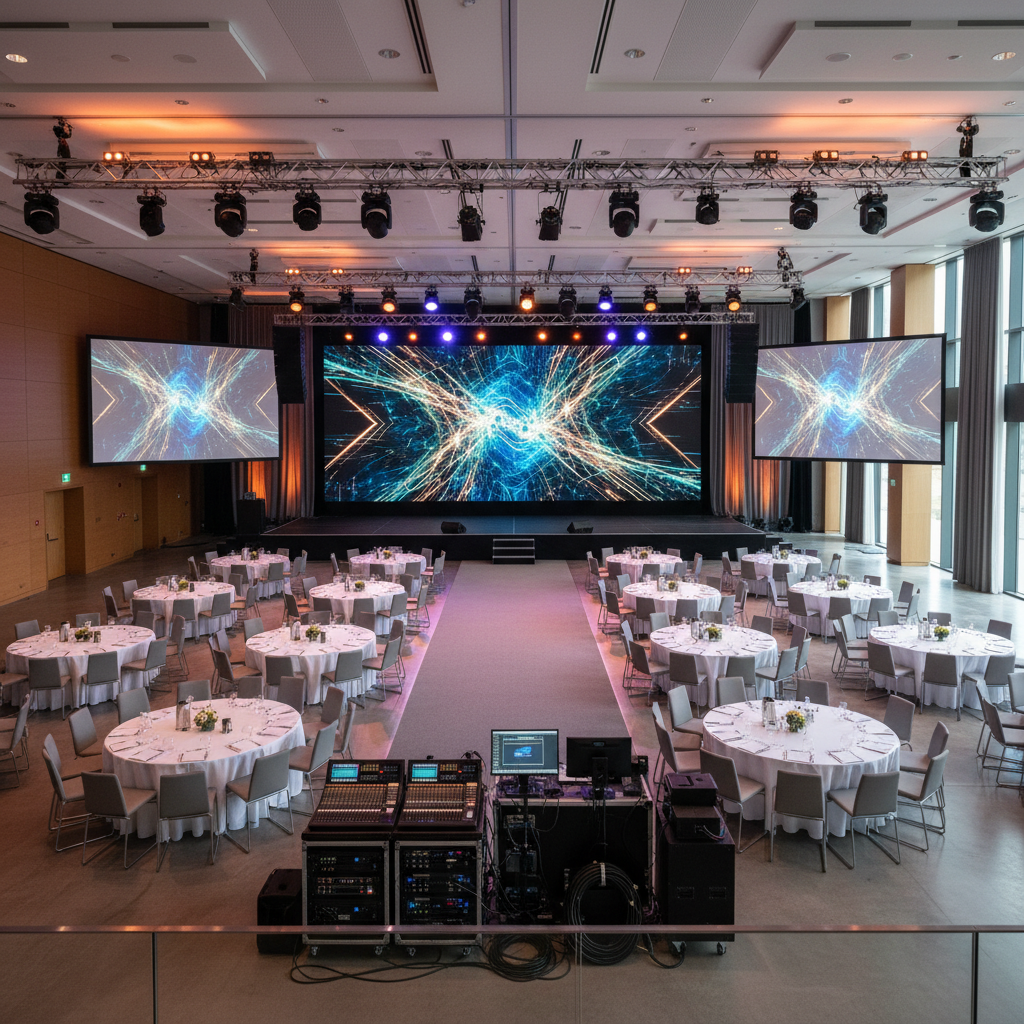
- General session used LED wall plus side screens; distributed audio ensured even coverage.
- Four breakouts turned in 30 minutes using pre-set stages and labeled patch sheets.
- Two handhelds and two lavs were hot at all times; deck freeze at T-48 hours.
Black-tie gala with live band
- Walk-in lighting on dimmers, moving heads for reveals, and soft key light for speeches.
- Stage monitors for performers; FOH logs kept music peaks higher than speech levels.
- Redundant playback and recording for highlight reels.
Trade show + product demos
- Floor plan placed power drops and cable ramps to keep aisles clear and booths tidy.
- Short-throw projectors handled tight spaces; silent-seminar headsets improved demos.
- Network plan reserved bandwidth for production systems and streaming.
School prom and graduation
- DJ booth on clean power; audio and lighting separated to minimize interference.
- Uplighting set to school colors; safe cable paths around the dance floor.
- Scripted awards walk with pre-tested walk-on music and mic handoffs.
Local considerations for events in Mississauga
- Plan for variable weather and quick load-ins; buffer time helps gear acclimate in winter and summer humidity.
- Peak dates fill fast during graduation and wedding seasons; secure AV holds early for multi-room events.
- Coordinate with venue operations for parallel hall turnovers and late-night strikes to minimize disruptions.

Frequently Asked Questions
Planners ask about lead times, backups, presenter support, and house-vs-vendor choices. Lock content deadlines, keep two of anything mission-critical, brief presenters early, and pick the AV model that fits your schedule and risk tolerance.
How early should I finalize presentation content?
Aim to freeze decks 24–48 hours before doors. This gives technicians time to test codecs, embed fonts, and label cues. For multi-speaker programs, collect all files in a single folder structure and confirm naming conventions.
What backups matter most for AV?
Keep two of anything that can stop the show: wireless handhelds, lavs, playback laptops, key cables/adapters, and recording paths. Mirror content to a second device and keep fresh batteries, gaffer tape, and a basic tool kit at front-of-house.
How do I choose between house AV and an external vendor?
Choose house AV for speed, integration, and a single accountable team. Bring an external vendor for specialty gear or brand-preferred consoles. A hybrid model blends both. Document responsibilities and escalation paths either way.
What sound level works for speeches vs. music?
Keep speech comfortably below concert levels and log peaks. Many teams target levels that are clear without being harsh; music segments can be louder, while speeches should prioritize intelligibility. Use a calibrated meter and adjust to room acoustics.
Key takeaways
Standardize formats, set deadlines, build redundancy, and rehearse. Decide on in-house, vendor, or hybrid based on complexity and speed. Document everything—from power to cues—and keep accessibility front and center to deliver confident, on-time shows.
- Lock formats and deadlines; share templates with presenters in advance.
- Design redundancy on critical paths; label cables and devices clearly.
- Rehearse transitions; verify recordings and keep fresh batteries on deck.
- Choose the delivery model that matches your risk profile and timeline.
Plan a flawless program in Mississauga. Book a walkthrough, review room diagrams, and align AV early with our production team so your show flows perfectly across adjacent halls.
For room-flow inspiration, see our venue selection guide and staging best practices.