
Conference room setup ideas are the layout, technology, and flow choices that make meetings clearer, faster, and more engaging. For planners working in 75 Derry Rd W, Mississauga, the right setup balances seating, AV, acoustics, and catering so every agenda item lands—and decisions stick.
By Preet Dass · Mississauga Convention Centre
Last updated: 2026-04-24
Summary
Use space, sound, sightlines, and tech as one system. Choose a layout for your goal, confirm sightlines to screens, plan reliable power and hybrid gear, manage acoustics and lighting, and script traffic flow. At Mississauga Convention Centre, seven ~4,250 sq ft halls and integrated AV make these steps fast to execute.
This complete guide helps corporate planners, marketers, and school organizers turn ideas into room plans you can actually set and run. You’ll find practical checklists, layout rules of thumb, and Mississauga-specific examples using our seven elegant halls, on-site AV, and 700 free parking spots.
- Understand core conference room setup principles (layouts, AV, acoustics)
- Pick the best layout for decision-making, training, or keynotes
- Build a repeatable AV and hybrid checklist that prevents downtime
- Map wayfinding, accessibility, and catering without clogging aisles
- See real setups from Mississauga Convention Centre’s ballrooms
What is conference room setup?
Conference room setup is the deliberate arrangement of seating, screens, audio, lighting, power, and traffic flow to serve a meeting’s goal. Great setups maximize sightlines and sound, reduce friction, and keep the agenda moving—whether you’re training 40 people or keynoting to hundreds.
At Mississauga Convention Centre, “setup” is a repeatable playbook. We start with the objective (decision, training, inspiration), then align layout, stage, screens, microphones, and catering routes. With seven halls (~4,250 sq ft each) and on-site technical support, we can scale the same logic from a 30-person leadership huddle to parallel 300-person breakouts.
- Outcome-first: Define decision, training, or networking as the primary outcome.
- Signal chain: Map what people need to hear, see, and do at each moment.
- Reliability: Build redundancy for power, microphones, and playback.
- Flow: Prevent chokepoints at doors, stage steps, and refreshment areas.
For a deeper space planning foundation, see our venue capacity guide, which many planners use as their first step before locking a layout.
Why conference layouts matter
Layouts change behavior. Cabaret and crescent rounds invite discussion; theater maximizes headcount; classroom favors note-taking. The right setup improves attention, participation, and retention, while the wrong one pushes people to the back row—physically and mentally.
We’ve seen the same presenter perform twice: once in tight theater with poor aisles and once with generous sightlines. Engagement doubled after we rebuilt the aisles and lighting. The content didn’t change—access did. That’s why our team treats layouts and AV as one system, not separate tasks.
- Attention: Shorter distances to screens and speakers increase focus.
- Participation: Table shapes and seating density influence how much people speak.
- Energy: Clear stage views and dynamic lighting keep long programs lively.
- Accessibility: Predictable routes and spacing support all guests, including mobility device users.
When comparing venues, evaluate if layouts can pivot quickly across a multi-day agenda. Our halls can flip from a morning keynote to afternoon workshops because staging, rigging points, and power are built in—saving you time between sessions. For selection tips, visit how to choose an event venue.
How conference room setup works (step-by-step)
Start with goals, draft a scaled plan, confirm sightlines, lock the AV signal chain, and stage-test the run of show. Then finalize power drops, aisle widths, signage, and catering routes. Freeze a change window so your crew sets with confidence and no surprises on show day.
- Define outcomes: Decision, training, alignment, launch, or networking.
- Pre-plot the room: Scaled diagram for stage, screens, aisles, tables, and power.
- Check sightlines: No seat should be blocked by a column, camera tripod, or décor.
- Specify AV: Mics (presenter + audience), playback, switcher, confidence monitors.
- Test audio: Walk the room; balance levels and minimize echo.
- Script flow: Entrances, Q&A mics, and traffic to refreshments and restrooms.
- Accessibility pass: Ramps, reserved seating, and predictable routes.
- Rehearse: 10–15 minutes with presenter and AV techs saves headaches later.
Our on-site team can co-create these plots and run-of-show details with you. Because power distribution, staging, and lighting are in-house, you avoid vendor handoffs that slow decisions. For large agendas, parallel setups across two halls help hold time.
Conference room layout types and when to use them
Choose the layout that matches your goal and content. Theater maximizes capacity; classroom supports note-taking; cabaret fuels discussion; boardroom empowers decisions; U-shape enables facilitated dialogue. You can mix formats across adjacent halls to match session types.
Common formats and use cases
- Theater: Best for keynotes and briefings with high headcount and minimal note-taking.
- Classroom: Rows of tables with chairs; supports training, laptops, and handouts.
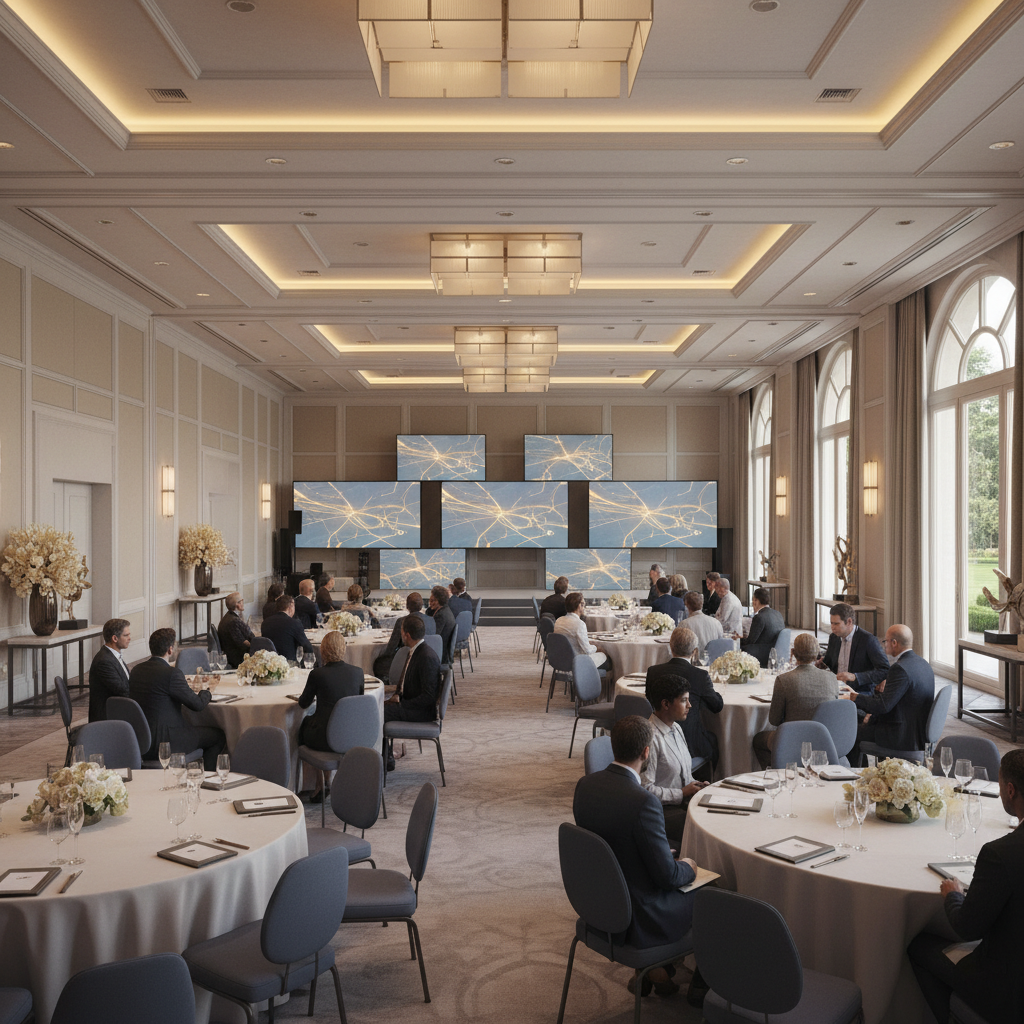
- Cabaret/Crescent rounds: Partial seating around rounds facing stage; promotes discussion.
- Boardroom: Single table for executive decisions and vendor shortlists.
- U-shape/Horseshoe: Facilitated workshops and collaborative planning with clear sightlines.
- Cluster pods: Small team stations for sprints, design thinking, and case work.
Rule-of-thumb space planning
Use these planning ranges to sketch capacities in a ~4,250 sq ft hall. We refine per agenda and staging footprint on a final diagram.
| Layout | Planning range (sq ft per person) | Notes |
|---|---|---|
| Theater | 8–10 | Maximizes seats; add at least two center aisles for egress and Q&A. |
| Classroom | 17–20 | Comfortable spacing for laptops and beverages; clear sightlines to stage. |
| Cabaret/Crescent | 12–14 | Face tables toward stage; leave rear chairs off for visibility. |
| U-shape | 30–35 | Supports facilitation and whiteboards; great for leadership sessions. |
| Boardroom | 35–40 | High-comfort seating and power at the table for devices. |
Need help picking between two formats? Our team can mock both in adjacent halls so stakeholders see and feel the difference before committing.
For décor tweaks that transform the same layout for different vibes, explore our event décor ideas.
AV and hybrid meeting checklist
Lock the signal chain first: sources to switcher to screens and speakers, with backup paths. For hybrid, add far-end mics, cameras, and return audio. Test share, record, and Q&A flows before doors open—then label presets so your crew can recover fast.
- Microphones: Presenter headset or lav, lectern mic, and 2+ wireless handhelds for Q&A.
- Speakers: Even coverage; avoid hot spots in front rows.
- Projection/LED: Brightness sized to throw distance and ambient light.
- Confidence monitors: Timers and next-slide view for presenters.
- Switching/Playback: Redundant laptops and a labeled input map.
- Cameras: PTZ at rear, side angle for panelists; presets for speaker, panel, and audience.
- Audio for remote: Mix-minus to prevent echo; separate audience and stage busses.
- Connectivity: Hardline where possible; protected SSID for staff.
- Power: Drops for stage, lectern, and camera positions; floor protection for cables.
We maintain in-house AV, lighting, staging, and technical support, which speeds load-in and reduces risk. For multi-room conferences, our crews mirror gear lists across rooms so your presenters experience the same interface in every session. See more corporate planning insights in our corporate venue overview.

Acoustics and lighting best practices
Control reflections, cover the room evenly with sound, and shape light to the task. Reduce echo with soft surfaces, light faces not screens, and keep walkways bright and safe. Good audio and lighting quietly make every speaker and slide easier to follow.
Sound you can trust
- Even coverage: Distribute speakers to avoid blasting the front and starving the back.
- Feedback control: Keep mics behind speakers; set gain before doors open.
- Panel audio: Use individual lavs; avoid passing handhelds during fast dialogue.
- Recording mix: Separate room and record feeds so the video sounds clean.
Lighting that supports the agenda
- Faces first: Light the presenter’s face from 45° angles to reduce shadows.
- Slides next: Keep projectors/LED bright and avoid spill onto screens.
- Wayfinding: Keep aisles and exits consistently lit to reduce stumbles.
- Panel mode: Add soft fill for panelists; dim the audience slightly for focus.
Because our halls are designed for both galas and conferences, we can tune the room for speaking clarity without losing atmosphere. The result: crisp speech and readable slides that help people retain more and stay engaged longer.
Flow, wayfinding, and accessibility
Design traffic like a transit map: clear routes, generous aisles, and predictable signage. Keep doors, registration, refreshments, and restrooms in a simple loop. Reserve accessible seating with clean sightlines, and avoid cable runs in primary paths.
- Entry and registration: Place check-in before the room threshold; prevent line spillback.
- Aisles: Keep frequent routes wide and unobstructed, especially near cameras and tech tables.
- Signage: Use simple arrows and consistent iconography; plan both standing and eye-level signs.
- Q&A flow: Assign runners and fixed mic stands; avoid blocking sightlines while moving mics.
- Cable safety: Ramp or cover every floor run; avoid tight turns at doorways.
Local considerations for 75 Derry Rd W
- Plan arrival buffers that match regional traffic patterns in Mississauga; stagger badge pickup to reduce morning bottlenecks.
- Build seasonal contingencies: winter outerwear storage and wet-floor mats; summer hydration and shaded patio transitions.
- Leverage on-site parking and simple highway access to structure session breaks around realistic commute and flight times.
Wayfinding feels invisible when it works. Our team places staff and signs where questions typically arise—outside doors and at turns—to keep people moving and sessions on time.
Catering and comfort strategy
Treat food and comfort as part of the learning cycle. Schedule breaks before attention dips, design menus that travel well to satellite rooms, and position stations to minimize lines. Hydration, light options, and cultural inclusivity keep guests energized and welcome.
- Break timing: Long sessions get 10–15 minute breathers; align with speaker transitions.
- Menu planning: Balance energizing items with hearty favorites; label for common allergens.
- Line management: Mirror stations on both sides of the room; split coffee and tea.
- Dietary inclusion: Offer Halal, vegetarian, and other regionally inspired options.
- Room resets: Use breaks to quietly flip lighting scenes or reconfigure pods.
We offer in-house catering spanning South Asian, Pakistani Halal, Middle Eastern, Sri Lankan, Caribbean, and Continental menus. Those options help you maintain cultural relevance without juggling off-site vendors. Explore ideas in our corporate catering guide.

Tools and resources for planners
Use a scaled diagram tool, an AV checklist, and a run-of-show template. Combine those with venue-provided specs and a brief rehearsal. With these three documents aligned, your crew will set quickly and presenters will know exactly what to expect.
- Scaled diagram: Stage, screens, tables, aisles, tech tables, power, and camera positions.
- AV checklist: Inputs/outputs, mics, speakers, cameras, playback, record, and redundancy.
- Run-of-show: Cues for lights, audio, slide advance, video roll, Q&A, and walk-out music.
- Staffing grid: Assign doors, mic runners, tech ops, and speaker wranglers.
- Contingency plan: What you’ll do if a presenter runs long or a laptop fails.
As you refine your checklist, browse posts under our conference centers tag for more nuts-and-bolts planning detail specific to multi-room agendas.
Case studies and examples
These quick scenarios show how we adapt layouts, AV, and flow to the agenda. Same halls, different goals—each plan aligns seating density, microphones, and catering so content and conversations land without friction.
1) Product team summit (200 attendees)
- Goal: Align on roadmap and showcase prototypes.
- Layout: Morning theater for keynotes; afternoon cluster pods for sprints.
- AV: Two camera angles for demos; confidence monitor for rapid-fire slides.
- Flow: Dual entrances prevent post-keynote bottlenecks; Q&A mics staged near aisles.
- Comfort: Mid-morning fruit and coffee; afternoon protein and vegetarian bowls.
2) Investor briefing (120 attendees)
- Goal: Communicate performance and field questions.
- Layout: Classroom for note-taking and laptops.
- AV: Headset mic for the presenter plus handhelds for Q&A; clean record feed.
- Flow: Registration outside doors; escort to reserved seating for VIPs.
- Comfort: Light lunch stations set in the foyer to keep the room presentation-ready.
3) School leadership workshop (80 attendees)
- Goal: Facilitated dialogue across districts.
- Layout: U-shape to keep everyone in the conversation.
- AV: Individual lavs for panelists; side-fill lighting for whiteboard work.
- Flow: Q&A mic stands at the open end of the U to reduce foot traffic.
- Comfort: Afternoon tea, coffee, and culturally inclusive snacks.
4) Hybrid training day (150 in-room + remote)
- Goal: Deliver clear instruction with remote participation.
- Layout: Classroom with wider aisles for camera sightlines.
- AV: PTZ cameras with presets; mix-minus audio; protected staff SSID.
- Flow: Remote Q&A via chat moderator to keep pace consistent.
- Comfort: Hydration stations placed near, not inside, primary aisles.
Want to see what’s possible within your dates? Our team can walk you through examples tied to your headcount and agenda, then adjust in real time. Start with this overview of corporate event venue rental for planning context.
Frequently Asked Questions
Great setups follow repeatable rules: align layout to the goal, confirm sightlines and audio coverage, plan hybrid gear and redundancy, and keep traffic and catering simple. These answers cover the questions we hear most before show day.
What is the best conference room layout for decision-making?
Use a boardroom or U-shape. Both formats keep eye contact, speed discussion, and leave space for a facilitator and screens. If you need to present first, start in crescent rounds, then flip to U-shape during a break so participants switch into dialogue mode.
How do we plan a reliable hybrid meeting?
Build the signal path on paper: sources → switcher → screens and speakers. Add PTZ cameras with presets, a dedicated remote audio mix, and hardline internet for stability. Rehearse screen share, recordings, and Q&A. Label presets so operators recover fast if anything changes.
How much space should we allow per attendee?
It depends on the layout and staging. As planning ranges, theater uses about 8–10 sq ft per person, classroom 17–20, crescent rounds 12–14, and U-shape 30–35. We’ll refine these based on stage size, camera positions, and aisle needs for your agenda.
What are common mistakes to avoid on show day?
Late rehearsals, unlabeled inputs, and blocked sightlines. Also avoid placing refreshment lines across primary aisles. Walk the room from the most distant seat, listen for echoes, and do a full tech check before doors open. Small adjustments early save minutes in every session.
Key takeaways and next steps
Align layout to goal, confirm sightlines and audio, plan hybrid gear with redundancy, and design traffic and catering to keep sessions on time. Share a scaled diagram, AV checklist, and run-of-show so every stakeholder knows the plan.
- Match layout to content: theater for reach, classroom for training, cabaret for dialogue.
- Pre-plot power, cameras, and tech tables so cables never cross main walkways.
- Use simple, consistent signage to guide movement without constant staff intervention.
- Build cultural inclusivity into menus so everyone is comfortably included.
Ready to map your agenda to a room plan? We’ll co-create diagrams and AV maps, then stage-test before show day. Explore spaces and options starting with our events you can host overview.
Let’s plan your next meeting in 75 Derry Rd W. Our team will tailor layouts, AV, and catering around your goals and timeline—so you can focus on the message, not the mechanics.